
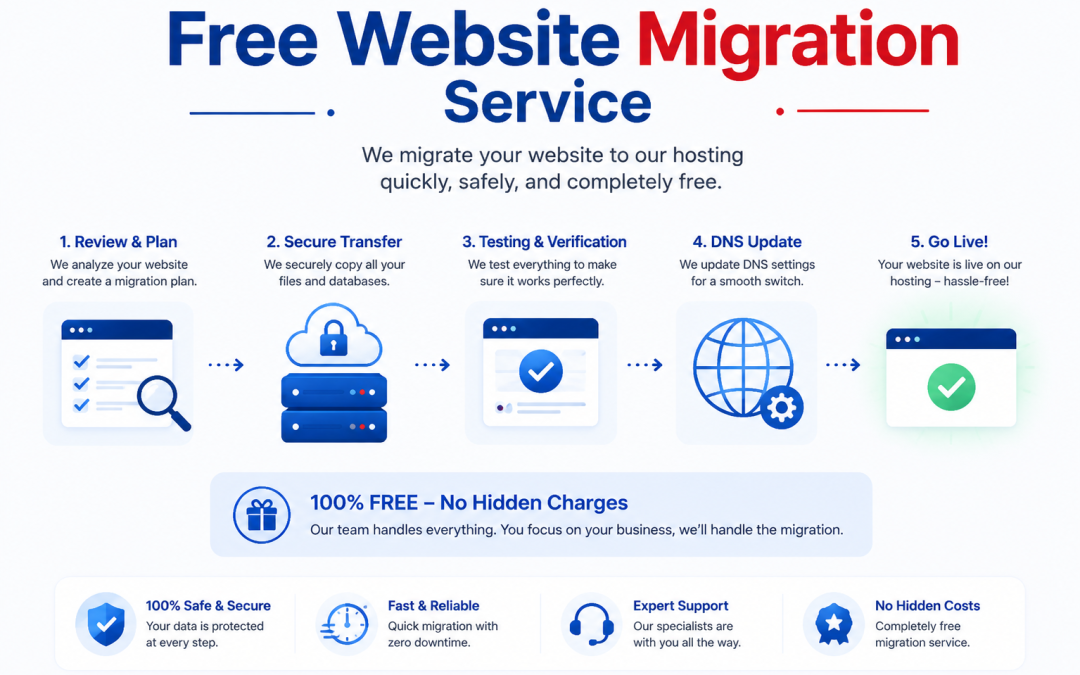
A free website migration implies the transfer of a website from one hosting server to another without charging the visitor extra during the transfer process. This happens mainly when a website owner requires better speed, higher security, or more reliable uptime. The main purpose is to move all the website contents safely and with absolutely no downtime so that users do not experience the portal being inaccessible at any time.
Understanding Website Migration and the Process Behind It
Website migration involves relocating a website’s components such as files, database system, emails, and configurations from one server to another. It also entails changing the servers and transferring data as well as sometimes a DNS (Domain Name System) update. DNS works like a directory that shows the browsers the physical location of a website. Only a sound migration operation keeps the site operating and open to users at all times during the site transfer.
What is The Reason for Website Migration?
There are a lot of reasons why websites get relocated in order to perform better and more stable. A few examples are:
- Slow loading speed on old hosting
- Higher server performance desire
- Upgrading to better SSL security certificates
- Use of CDN (Content Delivery Network) for faster global access
- More traffic handling ability through a scalable hosting infrastructure
Oftentimes, the old servers are going to be unable to cope with the traffic for which they were designed, so upgrading through migration is going to be needed.
Components of Free Website Migration
A well-conducted website migration usually consists of the following steps:
- Website Inspection and Backup
The website is initially inspected in its entirety. A full backup of the entire site is done, including files and databases. This safeguards the data in the event of a failure.
- Moving Data to the New Server
Afterward, websites are migrated to new servers, which means moving all the files to the new hosting server. A combination of computer data associated with images, source code, plugins, and database-jumping content is dispatched during website data migration.
- Launching a Testing Live
Before the new site can be made visible, a special site environment called a stage is initiated. It is a replica of the website used to carry out various tests. It facilitates assessment whether everything is working correctly. Once one is satisfied that all is working correctly the site changes from its staging phase and one is ready to make it live/public.
- Updating DNS And Launching
After all testing has been done, the DNS records are changed. It is this action that links the domain name with the new server. After completing this step, the website is live on the new hosting on the Internet.
Key Technical Issues In Migration
Several technical factors determine how smoothly a migration will go:
- Migration without downtime to ensure that the website remains accessible
- Keeping the database up-to-date for transferring the content accurately
- Providing help in case of email migration when business e-mails are hosted
- Conducting security checks such as malware scanning and firewall installation
- Optimizing for faster page loading performance
Users will continue to experience the site properly without being faced with errors or a broken page if these tasks are carried out.
Advantages Of A Successful Website Migration
If the migration is handled properly, the overall health of the website can be uplifted:
- Loading speed becomes faster and Core Web Vitals get better
- Ranking in SEO gets improved due to stable uptime
- Users experience less lag which results in a better interaction
- Your security will be enhanced as a result of the updated systems
- You will be ready for handling more visitors at peak times
Stable performance and the absence of frequent downtime also make websites more desirable to search engines.
Free website migration is more than just data transfer. It is a comprehensive technical operation that covers top to bottom server transfer, DNS changes, backups making, and optimization actions. This not only ensures that websites don’t get slower or more vulnerable to attacks, but also become more capable, reliable, and faster in serving their users.