
What Is a Load Balancer?
A load balancer is a type of system in hosting infrastructure that basically helps share the traffic of a website or an app among multiple servers. It is very similar to a “traffic police officer” on the internet.
Function of the load balancer
When there are simultaneous visits to a website by multiple users, a load balancer ensures that a single server is not overloaded. Rather, it directs each user request to different servers within the server cluster.
This significantly enhances the performance, speed, and even the availability of the website. In case a server becomes slow or stops working altogether, the load balancer does the failover support i.e., it automatically diverts the traffic to a different server that is up and running.
Load Balancer Work Process
Load balancers can distribute the tasks by various means such as:
- Round Robin (alternately sending requests to each server)
- Least Connections (sending traffic to the least busy server)
- IP Hashing (sending users based on their IP address)
Thanks to such intelligent distribution, the website remains fast and stable even when there is a large amount of traffic.
What Is Auto-Scaling?
Simple explanation of Auto-scaling
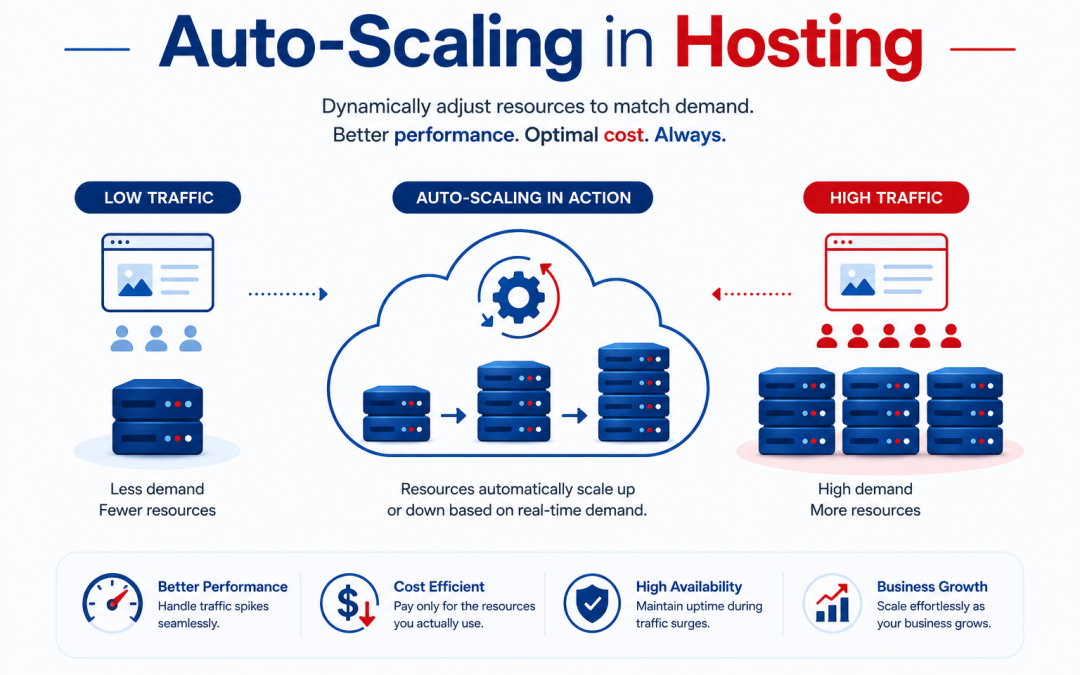
Auto-scaling is a feature of cloud computing that is able to automatically adjust server capacities by increasing or decreasing the number of server resources in accordance with the level of traffic demand.
Technically auto-scaling is a process where the system may “expand” or “contract” with the number of users visiting a website changing.
Additional workforce servers (generally known as virtual machines or instances) are brought on board during peak times. The extra low traffic servers are not there anymore to save you money.
Monitoring of Auto-scaling
Auto-scaling depends on monitoring tools that assess:
- CPU usage
- Memory (RAM) usage
- Network traffic
- Request load
When these metrics exceed a certain threshold, cloud platforms like Amazon Web Services, Microsoft Azure, or Google Cloud are used to automatically deploy new servers.
With this your website will survive sudden traffic surges like sales, exam results, or viral content.
How Load Balancers and Auto-Scaling Work Together
Load balancers and auto-scaling complement each other in cloud hosting architecture.
Besides, a load balancer would be the first to get all the inbound traffic and then divide it among the servers. Meanwhile, auto-scaling would be checking the servers’ load.
In case the load rises:
- The auto-scaler would increase the number of servers.
- The load balancer would add the new servers to the list of those delivering traffic.
On the contrary, if the load drops:
- The auto-scaler would free up the servers that are not required or less used.
- Then, the load balancer would stop routing traffic to these servers.
These two together offer high availability, scalability, and optimization of performance.
Imagine a very big online sale on an eCommerce website. During that time the website can be visited simultaneously by thousands of users. While the load balancer keeps the traffic in order, auto-scaling will be adding more server power so that the load can be dealt with successfully and smoothly.
Main Reasons That Make Them Indispensable In Hosting Situations
Load balancers and auto-scaling are essential since they make web portals fast, reliable, and also quite affordable.
They assist in:
- Workload reduction on servers
- Boosting website responsiveness
- Ensuring website availability (uptime without any interruptions)
- Minimizing expenses by running only necessary resources
- Dealing with sudden influxes in traffic
Such technologies are the mainstay of cloud hosting, web hosting, and even large-scale corporate or enterprise applications.
The role of the load balancer is to split the traffic among different servers so that no one gets overloaded while auto-scaling is the one responsible for determining how many servers are needed as per the demand or exhaustion. Alone, these two can still solve the issue of servers getting overworked; however, combining them results in a highly efficient system that will keep websites running smoothly even when subjected to heavy traffic conditions.