
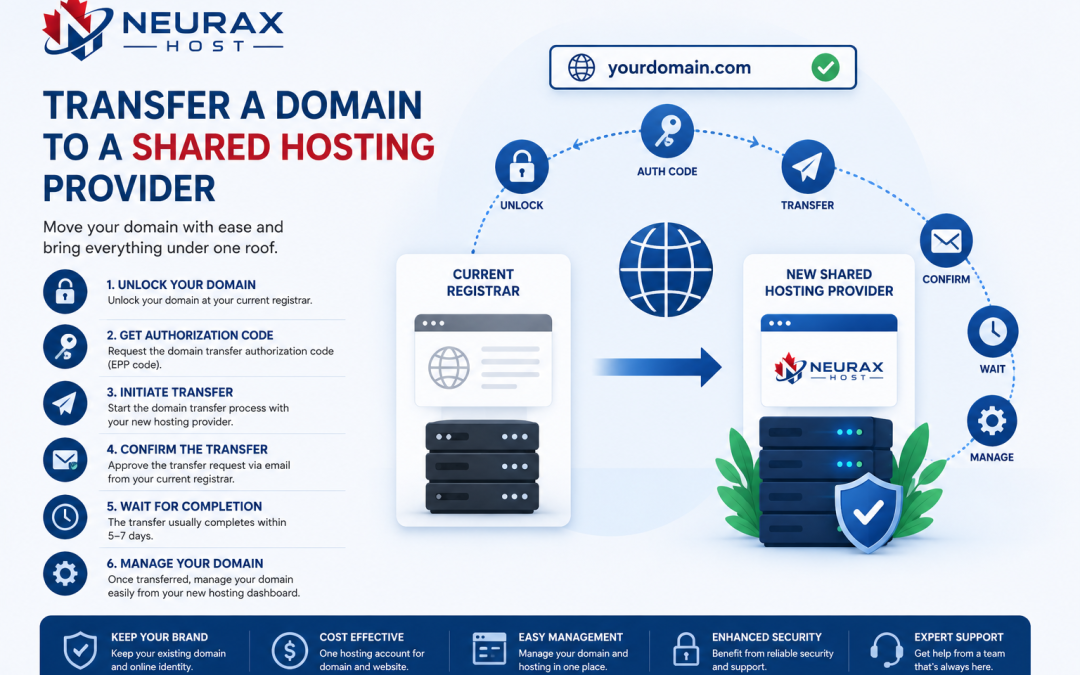
Transferring a domain to a shared hosting provider is a common step when consolidating website and hosting management in one place. It can simplify billing, improve control, and make DNS management easier. However, it is not a process that should be done impulsively. A domain transfer affects DNS settings, email services, website availability, and sometimes even SEO performance if handled incorrectly.
This raises an important question: what should you know before you transfer a domain to a shared hosting provider?
The answer involves technical preparation, timing considerations, security checks, and understanding how DNS and hosting systems interact. This guide breaks everything down so you can complete the transfer without downtime or data loss.
Understanding What a Domain Transfer Actually Means
A domain transfer is the process of moving your domain registration from one registrar to another. This is different from simply pointing a domain to a new hosting server.
When you transfer a domain to a shared hosting provider, you are moving control of the domain itself—not just the website hosting. This means:
- The new provider becomes your domain registrar
- You manage DNS settings through their system
- Renewal and billing move to the new provider
- Domain configuration is handled from a new control panel
It is important to understand this distinction because many users confuse domain pointing with domain transfer.
Why Businesses Transfer Domains to Hosting Providers
There are several practical reasons why website owners move domains to their hosting provider:
- Simplified management (domain + hosting in one place)
- Easier DNS configuration
- Centralized billing and renewals
- Faster technical support coordination
- Reduced risk of misconfigured DNS records
While convenience is a major benefit, it should not be the only factor driving the decision.
Key Things to Check Before Starting a Domain Transfer
Before initiating the transfer, there are several technical and administrative requirements you must verify.
- Domain Lock Status
Most domains are locked by default to prevent unauthorized transfers. You must unlock the domain from your current registrar before initiating the transfer.
- Authorization Code (EPP Code)
You will need an authorization code from your current registrar. This code acts as a security key to approve the transfer.
- Domain Age Requirement
Domains typically cannot be transferred if they are newly registered or transferred within the last 60 days.
- Access to Registered Email
The domain transfer approval process usually sends confirmation emails to the registered email address.
Without access to this email, the transfer cannot be completed.
How Domain Transfer Affects Your Website and Email
One of the most important considerations is how the transfer impacts your existing services.
Website Availability
Your website will remain online during the transfer if DNS settings are not changed. However, incorrect configuration may cause temporary downtime.
Email Services
If your email is connected to your domain (e.g., info@yourdomain.com), DNS changes during transfer can disrupt email delivery.
DNS Propagation Delays
After transfer, DNS updates may take several hours to fully propagate across the internet.
Proper planning is essential to avoid interruptions.
Comparing Domain Management Approaches
Before transferring your domain, it helps to understand how different management setups affect control and flexibility.
| Management Setup | Control Level | Ease of Use | Risk of Downtime | Best For |
| Separate Registrar + Hosting | High | Medium | Low if managed correctly | Advanced users |
| Domain + Shared Hosting Combined | Medium | High | Medium during misconfiguration | Small businesses |
| Managed Hosting Bundled Domains | High | Very High | Low | Beginners |
| Third-Party DNS Management (e.g., Cloud DNS) | Very High | Advanced | Very Low | Technical users |
This comparison shows that transferring a domain to a hosting provider simplifies management but may reduce flexibility depending on how DNS is handled.
DNS Settings Are the Most Critical Factor
DNS (Domain Name System) is what connects your domain to your website and email services. During a domain transfer, DNS settings must be carefully preserved.
Key DNS records include:
- A records (website IP address)
- MX records (email routing)
- CNAME records (subdomains)
- TXT records (verification and security settings)
If these records are not correctly transferred or reconfigured, your website or email services may stop working temporarily.
Email Disruption Risks During Domain Transfer
If your business email is tied to your domain, extra caution is required.
Common risks include:
- Incoming emails bouncing or being delayed
- Outgoing email authentication failure
- Temporary email downtime
- Lost MX record configurations
To prevent this, you should:
- Backup all existing DNS records
- Recreate MX records on the new provider
- Avoid changing nameservers during active email usage periods
Email continuity should always be a priority during domain migration.
Timing Your Domain Transfer Correctly
Timing plays an important role in avoiding disruptions. It is recommended to avoid transferring domains during:
- High traffic business hours
- Active marketing campaigns
- Product launches or sales events
The best time to transfer is during low-traffic periods when website activity is minimal. This reduces the impact of any temporary DNS propagation delays.
Security Considerations Before Transfer
Domain transfers involve sensitive authorization processes. Security should not be overlooked. Before initiating a transfer, ensure:
- Domain lock is properly enabled/disabled as required
- EPP code is securely stored
- Registrar email access is verified
- Two-factor authentication is enabled where possible
Unauthorized transfers are rare but possible if security practices are weak.
What Happens After You Transfer to a Shared Hosting Provider
Once the transfer is complete, your domain will be managed by your hosting provider. At this stage, you will typically:
- Access domain settings from hosting control panel
- Manage DNS records directly within hosting environment
- Renew domain through hosting provider billing system
- Link domain more easily to hosting services
This centralization can simplify long-term management, especially for beginners or small businesses.
Common Mistakes to Avoid During Domain Transfer
Many issues occur due to avoidable errors. Some of the most common mistakes include:
- Not backing up DNS records
- Forgetting to unlock the domain
- Using an expired authorization code
- Changing DNS settings too early
- Ignoring email service configuration
- Transferring during peak business activity
Avoiding these mistakes ensures a smooth and stable transition.
When You Should Not Transfer Your Domain
In some cases, transferring a domain to a shared hosting provider may not be the best decision.
You may want to avoid transfer if:
- You use advanced DNS management tools externally
- You manage multiple domains across different systems
- You require enterprise-level domain security features
- You prefer separating hosting and domain control for flexibility
In such cases, keeping the domain with a dedicated registrar while connecting it to hosting via DNS may be a better approach.
Transferring a domain to a shared hosting provider can simplify website management, reduce complexity, and centralize control. However, it is not just a routine technical step—it involves careful handling of DNS settings, email configurations, security approvals, and timing considerations. If done correctly, the process is smooth and does not affect website availability. If done carelessly, it can lead to downtime, email disruptions, or configuration issues.
The key is preparation: verify domain requirements, back up DNS records, secure authorization details, and choose a low-traffic window for execution. With proper planning, transferring your domain to a shared hosting provider becomes a safe and efficient step toward streamlined website management.