
When people start a website, they often face the same confusion:
Why is my website slow?
Which hosting should I choose?
Do I need shared hosting or VPS?
This is a very common problem for beginners, bloggers, and small business owners. In fact, most new website owners start with limited knowledge about hosting and later upgrade when they face issues like slow speed, downtime, or security risks.
Studies in the web hosting industry suggest that a large majority of beginners (around 60–70%) start with shared hosting because it is cheaper and easier. However, many later move to VPS when their website grows.
This blog will help you understand both options in simple ways. You will learn:
- What shared hosting is
- What VPS hosting is
- Their differences
- Which one is better for beginners
- How to avoid common mistakes
- What Is Shared Hosting?
Shared hosting means your website is stored on a server that is shared with many other websites. Think of it like renting a room in a shared apartment. You get your own space, but you share the kitchen, electricity, and water with others.
Key Features of Shared Hosting:
- Low cost (usually $2–$10 per month)
- Easy setup for beginners
- No technical knowledge needed
- Managed by hosting company
Best for:
- Personal blogs
- Small business websites
- Portfolio sites
- New websites with low traffic
Problem beginners face:
Many users ask:
“Why is my shared hosting website slow sometimes?”
Simple answer:
Because resources are shared. If another website on the same server gets high traffic, your website may slow down.
This is called the “noisy neighbor effect.”
What Is VPS Hosting?
VPS stands for Virtual Private Server.
It means your website still shares a physical server, but you get a private section with dedicated resources like CPU, RAM, and storage. Think of it like living in an apartment building but having your own fully independent apartment.
Key Features of VPS Hosting:
- More speed and performance
- Dedicated resources
- Better security
- More control over settings
Best for:
- Growing websites
- Online stores
- Business websites with traffic
- Developers needing customization
Is VPS Too Complicated For Me?
Yes, sometimes. VPS requires basic technical knowledge, unless you choose a managed VPS option.
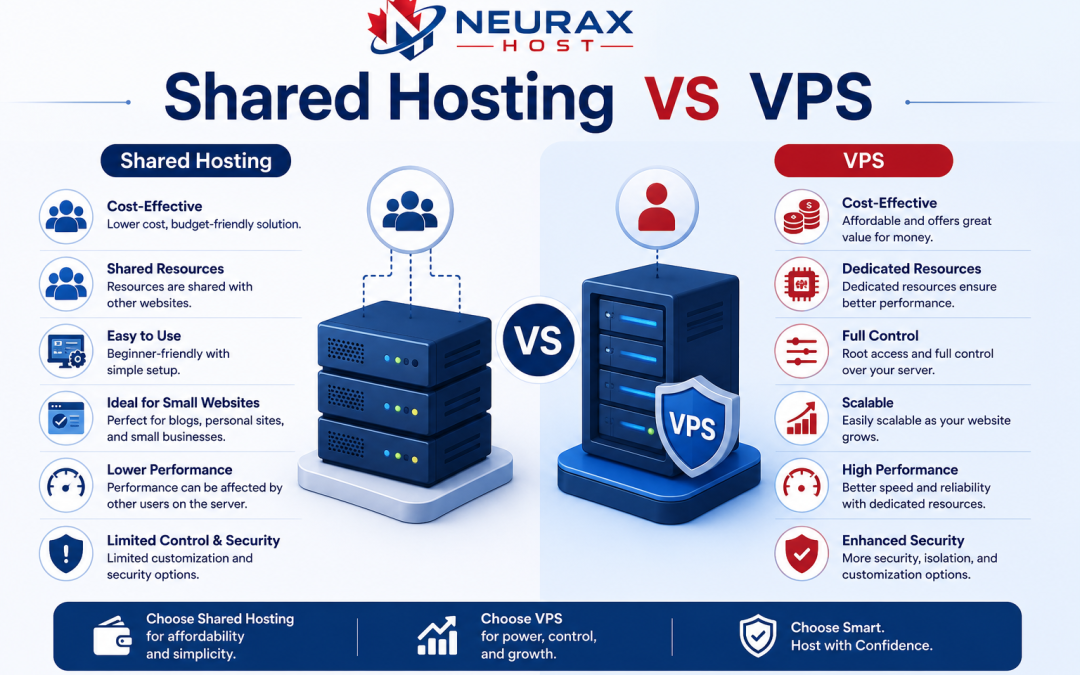
Shared Hosting vs VPS: Simple Comparison Table
| Feature | Shared Hosting | VPS Hosting |
| Cost | Very low | Medium to high |
| Performance | Basic | High |
| Security | Moderate | Strong |
| Speed | Can be slow during traffic spikes | Stable and fast |
| Control | Limited | Full control |
| Technical skills needed | None | Basic to advanced |
| Best for | Beginners | Growing websites |
Why Websites Become Slow on Shared Hosting
Many beginners complain:
My website was fast at first, but now it is slow.
Here are the real reasons:
Shared Resources
All websites use the same CPU and RAM.
High Traffic on Other Sites
If another website gets sudden traffic, your site can slow down.
Limited Optimization
Shared hosting does not allow deep performance tuning.
Plugin Overload (WordPress users)
Too many plugins can make shared hosting slower.
Simple Fixes:
- Use lightweight themes
- Remove unused plugins
- Enable caching
- Upgrade hosting plan when needed
VPS Hosting Advantages for Beginners
Even though VPS sounds technical, it has strong benefits:
Better Performance
Your website runs faster because resources are reserved for you.
Improved Security
You are less affected by other websites.
Scalability
You can increase RAM or CPU as your website grows.
More Control
You can install custom software or configurations.
Shared Hosting Advantages
Shared hosting is still the most popular starting point.
- Very Affordable
Perfect for people on a small budget.
- Easy Setup
Most providers offer “one-click WordPress install.”
- No Technical Skills Needed
Everything is managed by the hosting company.
- Maintenance Included
Server updates and security patches are handled for you.
Important Tips for Users
No matter which hosting you choose, follow these tips:
Always Use Backups
Choose hosting with automatic backups. This protects your website if something goes wrong.
Use SSL Security
SSL makes your website secure (https://). It also improves Google ranking.
Choose Reliable Hosting Providers
Some trusted providers include:
- Hostinger
- Bluehost
- SiteGround
These companies are popular among beginners because they offer:
- Easy dashboards
- Good customer support
- Affordable starter plans
Monitor Website Speed
Use free tools like Google PageSpeed Insights to track performance.
Security Comparison: Shared Hosting vs VPS
Shared Hosting Security:
- Basic firewall protection
- Risk of cross-site contamination (rare but possible)
- Depends heavily on provider security
VPS Security:
- Strong isolation from other users
- Custom firewall options
- Better control over access
Simple Truth:
If security is your top priority, VPS is stronger. But for beginners, shared hosting is usually safe if managed well.
Cost Comparison
Shared Hosting:
- $2–$10 per month
- Best for small budgets
VPS Hosting:
- $10–$50+ per month
- Depends on resources
Important Insight:
Many beginners choose shared hosting because it reduces startup cost. Once traffic increases, upgrading to VPS becomes logical.
When Should You Switch from Shared Hosting to VPS?
You should consider upgrading when:
- Your website loads slowly consistently
- You get more than 10,000–50,000 monthly visitors
- You run an online store
- You need more security control
- Your website is growing in business value
Common Beginner Mistakes
Choosing Based Only on Price
Cheapest is not always best long-term.
Ignoring Scalability
Many users forget their website will grow.
Not Checking Support Quality
Good support is important when something breaks.
Overloading Shared Hosting
Installing too many heavy plugins can slow everything down.
Which Is Better
Shared Hosting is better if:
- You are just starting
- You have low traffic
- You want simple setup
- You have a small budget
VPS Hosting is better if:
- Your website is growing fast
- You need speed and control
- You run a business or online store
- You can handle basic technical tasks
The best strategy is simple:
- Start with shared hosting
- Learn how your website performs
- Upgrade to VPS when needed
This approach saves money and reduces complexity while still allowing growth.
Most successful websites today started small. They did not begin with expensive hosting. They started simple, improved step by step, and upgraded when traffic demanded it.
So instead of asking “Which is best overall?”, the real question is:
“Which one is best for my current stage?”
If you choose based on your needs, not just features, you will always make the right decision.