
Running a small business means handling many tasks every day. You may need to answer customer questions, manage bookings, check your calendar, follow up on leads, track jobs, send invoices, and review business reports. Doing all this with different tools can become confusing.
This is where a Neurax Smart CRM can help. A CRM, or Customer Relationship Management system, helps businesses keep customer information and daily business activity organized. Instead of moving between many apps, a smart CRM can bring important work into one place.
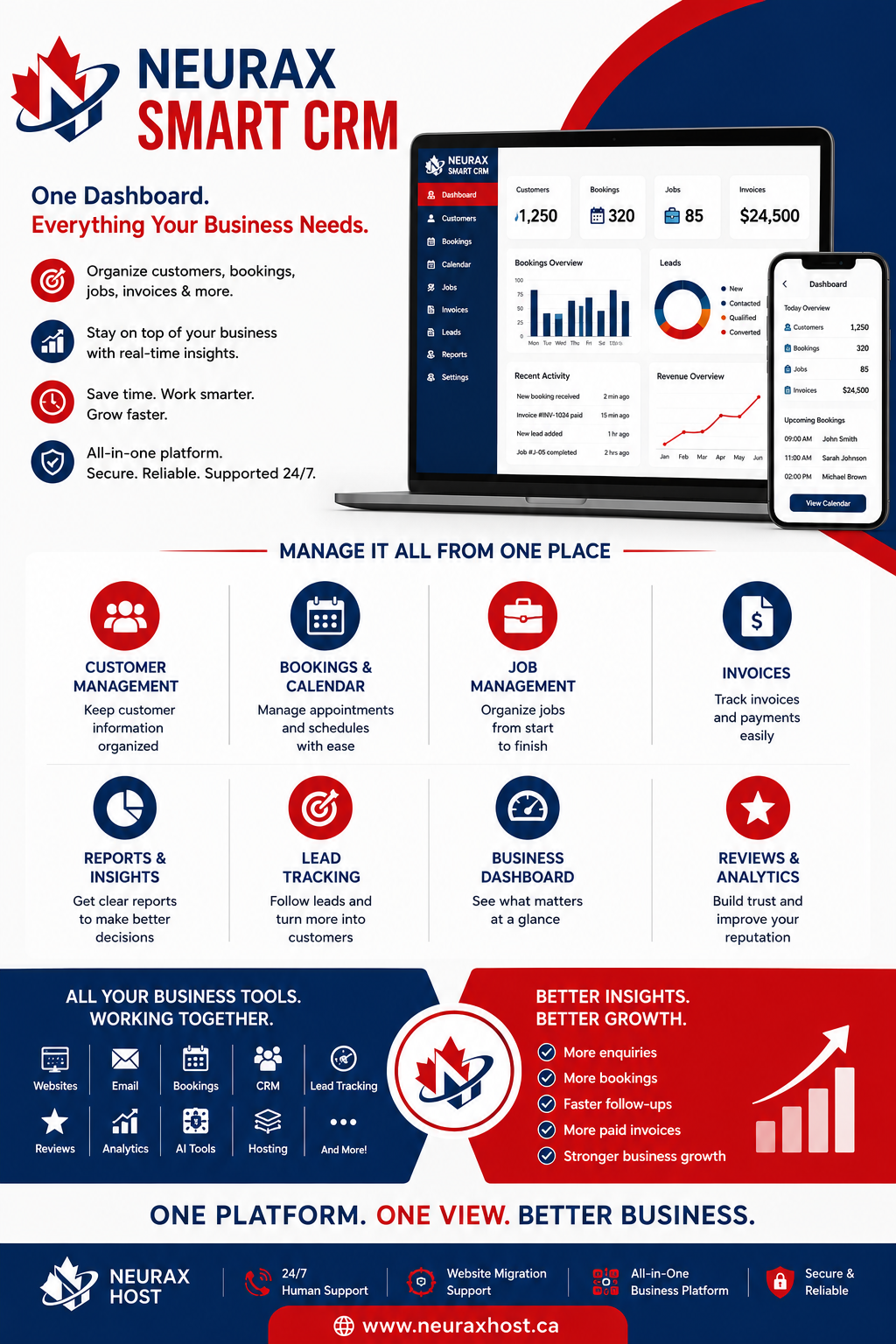
Neurax Smart CRM is designed to help businesses manage customers, bookings, calendars, jobs, invoices, and reports from one dashboard. It fits with Neurax Host’s wider business platform, which also connects websites, email, booking, lead tracking, reviews, analytics, and other business tools.
Why Do Small Businesses Need a CRM?
Customer information can quickly become difficult to manage. One customer may contact you by phone. Another may fill out a website form. Someone else may book an appointment. You may also have old customers who need a follow-up.
Without a proper CRM, important details can get lost. A small business CRM helps solve this problem by keeping customer records in an organized system.
You can use CRM data to understand:
- Who contacted your business
- What service they need
- Which bookings are coming up
- Which jobs are active
- Which invoices are pending
- Which customers need a follow-up
- How your business is performing
This means less time searching through emails, notes, spreadsheets, and different apps.
See how a CRM can make everyday business tasks simpler. Compare the challenges of working without a CRM with the organized workflow of Neurax Smart CRM.
What Can Neurax Smart CRM Manage?
The main value of Neurax Smart CRM is that it connects several everyday business tasks. Instead of using one tool for customer management and another for bookings, businesses can manage important information through a connected dashboard.
| Daily Business Problem | Without CRM | With Neurax Smart CRM |
| Customer details | Scattered | Organized |
| Lead follow-up | Easy to miss | Easier to track |
| Bookings | Separate tools | Centralized |
| Tasks | Manual reminders | Organized workflow |
| Customer history | Hard to find | One place |
Manage Customers Without Losing Important Details
Customer management is one of the most important CRM features. Imagine a customer calls today and asks for a quote. A few days later, they contact the business again. If the information is only saved in a notebook or email inbox, it may take time to find the details.
A CRM creates a central customer record. This can make it easier to understand the customer journey from the first enquiry to the completed job. For businesses that receive many enquiries, this can also make follow-ups more organized. Keep customer details clear, understand their needs, and never miss the next step.
| CRM Feature | How It Helps a Business |
| Customer Management | Keeps customer details and interactions organized |
| Bookings | Helps manage appointments and booking requests |
| Calendar | Keeps meetings, appointments, and jobs easier to track |
| Job Management | Helps organize active and completed work |
| Invoices | Makes invoice tracking easier |
| Reports | Helps review business activity and performance |
| Lead Tracking | Helps businesses follow potential customers |
| Business Dashboard | Gives a simple view of important business data |
This type of setup is especially useful for service businesses where customer calls, appointments, jobs, and payments are closely connected.
Keep Bookings, Calendars, and Jobs Organized
Missed appointments can hurt customer trust. A busy business may have several bookings and jobs on the same day. Managing them manually can lead to mistakes. A CRM with booking and calendar management helps bring these tasks together.
With Neurax Smart CRM, businesses can manage customer bookings, calendar activity, and jobs from a connected system. This can make it easier to see what is scheduled and what work still needs attention.
For example, a home service company could use its CRM to keep track of:
- Customer details
- Service requests
- Appointment times
- Active jobs
- Completed work
- Invoice status
This creates a clearer workflow from booking to job completion.
Track Invoices and Business Activity
Getting the job done is only one part of running a business. Businesses also need to know what has been invoiced and what has been paid. Invoice tracking can help reduce the chance of forgetting important payment tasks.
A connected CRM can also make it easier to link customer activity with business records. This becomes even more useful when combined with business analytics. Neurax’s Business Dashboard is designed to bring information such as enquiries, booking requests, reviews, paid invoices, lead pipeline, and estimated lead value into one view. That gives business owners a better idea of what is happening after a website visitor becomes a lead or customer.
Use Reports to Make Better Business Decisions
A CRM should not only store information. It should also help business owners understand that information.
Reports can answer simple but important questions:
Are enquiries increasing?
How many bookings are coming in?
Which leads need follow-up?
How many invoices have been paid?
How much business is coming from the website?
These insights can help owners make better decisions. For example, if enquiries are growing but bookings are not, the business may need to improve its follow-up process.
If bookings are high but invoices are delayed, payment management may need more attention. Good CRM reporting turns everyday business data into useful information.
Why Neurax Smart CRM Can Be Useful for Growing Businesses
Many small businesses start with simple tools. That is fine at the beginning. But as the customer list grows, manual tracking becomes harder. Neurax Smart CRM offers a more connected approach. It is part of Neurax Host’s broader business platform, where hosting can work alongside websites, email, CRM, bookings, reviews, lead tracking, analytics, and AI tools.
The benefit is not simply having another software tool. The bigger benefit is having important business information in one place. Neurax also provides 24/7 human support and website migration support, which can be useful for businesses that do not want to handle every technical task themselves.
Is Neurax Smart CRM Right for Your Business?
A CRM can be useful if your business gets regular customer enquiries, bookings, service requests, or payments.
It may be especially helpful for:
- Local service businesses
- Consultants
- Agencies
- Contractors
- Appointment-based businesses
- Small eCommerce businesses
- Growing startups
- Businesses that need lead tracking
The right CRM should make work easier, not add more complexity. That is why a simple dashboard, clear customer records, booking management, job tracking, invoices, and useful reports can make a real difference.
Managing a business should not mean searching through five different tools just to find one customer detail. Neurax Smart CRM brings key customer and business tasks into one connected system. It can help businesses organize customers, bookings, calendars, jobs, invoices, leads, and reports more easily.
For a growing business, this means fewer scattered records and a clearer view of daily work. And when CRM, website, hosting, email, bookings, reviews, analytics, and other business tools can work together, the focus can stay where it belongs: serving customers and growing the business.