
A small business website should do more than show your phone number, services, and company information. It should help turn website visitors into real enquiries, calls, bookings, and customers. Many small businesses have a website but still depend on phone calls, social media messages, or word-of-mouth to bring in new customers. The problem is often not the website itself. It is what happens after a visitor arrives.
A website becomes a lead generation tool when it gives visitors a clear reason to take action and makes it easy for the business to capture, manage, and follow up with those enquiries. This guide explains how to build that process in a simple way.
Start With a Website Built Around Customer Needs
A customer does not visit a business website to admire its design. They usually want an answer.
They may want to know:
- What services do you offer?
- How much does it cost?
- Where do you serve customers?
- Can I book an appointment?
- Can I request a quote?
- How quickly can someone respond?
Your website should answer these questions quickly.
A strong small business website should have clear service pages, easy-to-find contact details, simple navigation, trust signals, and strong calls to action.
Instead of making visitors search for the next step, guide them.
For example:
Need a quote? → Request a Quote
Ready to book? → Book an Appointment
Have a question? → Contact the Business
This simple approach can make a website more useful for both the customer and the business.
Give Visitors a Clear Call to Action
A call to action, or CTA, tells visitors what to do next. Without a clear CTA, someone may read a service page and leave without contacting the business.
Good CTAs should match the visitor’s intent.
| Visitor Intent | Useful Website Action |
| Wants more information | Ask a Question |
| Needs pricing | Request a Quote |
| Ready to buy | Get Started |
| Wants an appointment | Book Now |
| Needs help quickly | Call Now |
| Comparing services | View Services |
The CTA should also be easy to see on mobile devices. A customer should not have to scroll through several pages before finding a way to contact the business. For local businesses, simple actions can matter most. A phone call, quote request, contact form, or booking can turn an anonymous visitor into a potential customer.
Make Lead Capture Simple
Getting a visitor to click a button is only the beginning. The next step is capturing useful information. A lead capture form does not need to be complicated. In many cases, asking for too much information can make people leave.
Start with information that helps the business respond:
- Name
- Phone number
- Service needed
- Short message
For some businesses, the form can also ask for a preferred appointment time, project details, location, or estimated budget. Make the process easy so customers can tell you exactly what they need.
This is where a Small Business Website Package can provide more value than a basic website alone. A business may need the website, forms, hosting, email, customer management, and booking tools to work together instead of operating as separate systems.
Connect Your Website to Calls and Online Booking
Not every customer wants to fill out a form. Some people prefer calling. Others want to book a time without waiting for a reply. That means a lead generation website should give customers different ways to take action.
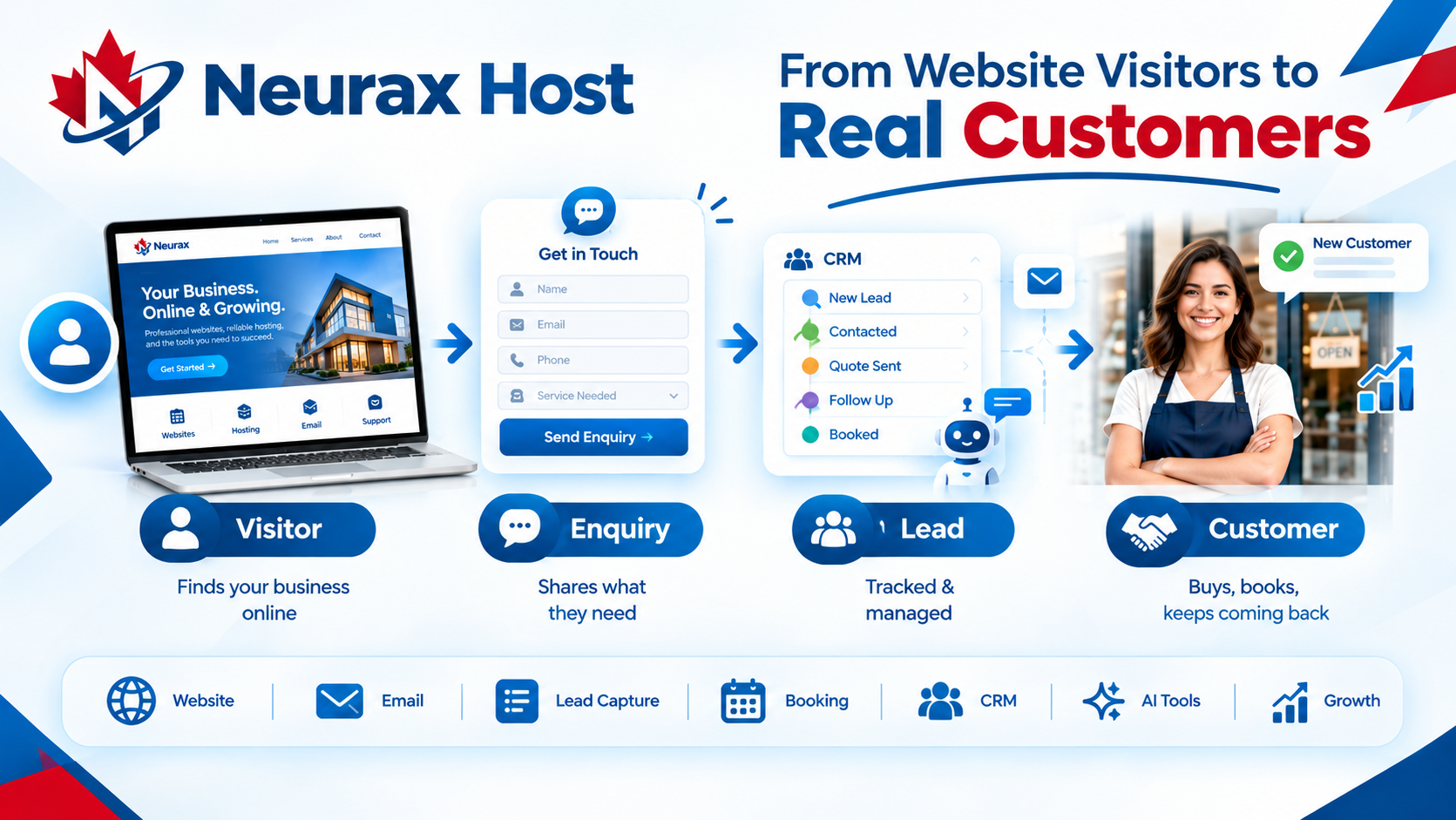
A simple customer journey can look like this:
Website → CTA → Form / Call / Booking → Lead Capture → CRM → Follow-Up
For example, a customer searching for a local contractor may visit a service page, read about the service, click “Request a Quote,” submit their details, and then receive a follow-up.
Another customer may prefer to call directly. Someone else may choose an available appointment time. Giving customers these options removes unnecessary steps between interest and enquiry.
Use a CRM to Manage Every New Lead
Generating leads is not enough if those leads are forgotten.
A business can receive enquiries through forms, calls, bookings, email, and other channels. Without a clear system, follow-ups can easily be missed.
A CRM helps keep customer information and lead activity organized.
Instead of asking:
“Where did that enquiry go?”
the business can see:
New Lead → Contacted → Quote Sent → Follow-Up → Booked → Customer
This makes the website part of a larger sales process.
For small businesses, this can be especially useful because the same person may handle sales, customer service, appointments, and daily operations.
A Small Business Online Services solution that connects the website with customer management can reduce the need to move information manually between different tools.
Add AI and Automation Where It Helps
AI should not replace the human side of a small business. It should reduce repetitive work. For example, an AI website assistant can help answer common questions, collect basic customer information, qualify enquiries, gather quote details, or help with appointment scheduling.
This can be useful when customers visit a website outside normal business hours. The important part is keeping the experience simple. A customer should be able to ask a question and move toward the next useful action instead of being trapped in a long automated conversation. Automation can also help with follow-ups, appointment information, customer replies, and lead organization. For businesses that receive regular enquiries, these small improvements can make the website work more consistently throughout the day.
Bring Your Website and Business Tools Together
A lead-generating website works best when the important parts of the customer journey are connected. Buying a domain from one provider, hosting from another, using separate email software, adding another booking tool, and then managing leads somewhere else can create unnecessary complexity. An all-in-one approach brings more of these functions together.
For example:
Website → Email → Lead Capture → CRM → Booking → Reviews → Business Analytics
This gives the business a clearer view of what happens after someone visits the website. Neurax Host’s Business Launch Package follows this type of model by combining a business domain, website, managed hosting, professional email, CRM, booking, reviews, analytics and AI-related tools under one platform. The available packages expand from basic online setup to lead tracking, bookings and AI-assisted customer interactions. The benefit is not simply having more tools. The real benefit is having the tools work around the same customer journey.
Turn Your Website Into a Business Growth Tool
A website should not be treated as an online brochure that sits on the internet and waits for visitors. It should help answer questions, create trust, capture enquiries, support calls, accept bookings, organize leads, and make follow-up easier.
The most useful process is simple:
Attract → Explain → Engage → Capture → Follow Up → Convert
Start with a website that clearly explains what the business offers. Add strong CTAs. Make forms and calls easy. Add online booking when customers need it. Connect leads to a CRM. Then use automation or AI where it can save time.
For small businesses looking for a more connected setup, an all-in-one Small Business Online Services approach can bring these functions together instead of managing each tool separately. That turns the website from a basic online presence into a practical lead generation system.