
Choosing WordPress hosting can feel confusing. Many hosting providers offer WordPress plans, but not every plan gives you the same level of performance, security, support, or management. Managed WordPress Hosting is different because it is designed to reduce the technical work that comes with running a WordPress website. Instead of handling everything yourself, many important hosting tasks are built into the service. For small business owners, this can mean less time fixing hosting problems and more time focusing on customers, content, sales, and growth.
What Makes Managed WordPress Hosting Different?
Traditional WordPress hosting mainly gives you the infrastructure needed to run your website. You get server space, WordPress installation, and basic hosting tools—but many important tasks can still be left to you. That means you may need to take care of WordPress updates, backups, website security, caching, performance optimization, migration, and troubleshooting yourself.
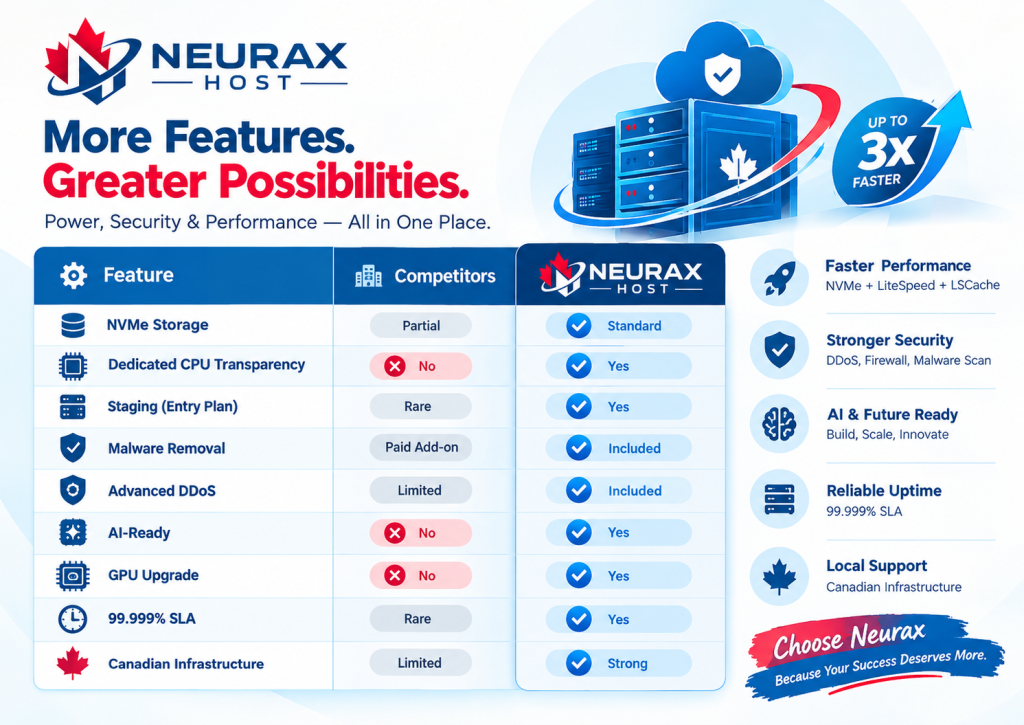
Managed WordPress Hosting takes a more hands-on approach. Instead of simply hosting your website, the hosting environment is designed specifically around WordPress, with performance, security, backups, updates, and technical assistance built into the service.
With Neurax Managed WordPress Hosting, these features are designed to work together, helping reduce technical workload while giving your website the infrastructure it needs to perform reliably.
Managed WordPress Hosting: Standard Hosting vs Neurax
| Feature | Standard WordPress Hosting | Managed WordPress Hosting | Neurax Advantage |
| WordPress Optimization | Basic server environment; optimization may require manual setup | Hosting environment is designed around WordPress performance | LiteSpeed, NVMe storage, caching, CDN options and dedicated resources help create a performance-focused environment |
| WordPress Updates | Often requires manual management | Updates can be automated | Automatic WordPress core updates and managed update options reduce routine maintenance |
| Plugin Updates | Usually handled by the website owner | Can be managed with safer update workflows | Safe plugin update options help reduce the maintenance burden |
| Website Speed | Performance depends heavily on configuration | Performance tools are integrated into the hosting environment | LiteSpeed caching + NVMe storage + dedicated CPU resources support faster WordPress performance |
| Security | Basic server protection may be included | More WordPress-focused security features | Firewall, DDoS protection, malware scanning/removal and brute-force protection provide multiple layers of protection |
| Backups | May require plugins or separate services | Managed backup options are included | Backup frequency varies by plan, with daily and on-demand options available on higher plans |
| SSL | May require manual configuration | SSL is commonly included | Free SSL helps secure visitor connections without requiring a separate SSL purchase |
| Website Migration | Usually self-managed | Provider-assisted migration may be available | Free WordPress migration helps move an existing website with less technical effort |
| Staging Environment | May require a plugin or separate setup | Available with managed plans | Staging lets you test website changes before making them live |
| WooCommerce Support | General WordPress hosting environment | Plans may include eCommerce-focused features | Higher Neurax plans include WooCommerce optimization and additional resources |
| Support | General hosting assistance | More WordPress-focused assistance | Support is available for hosting and WordPress-related requirements |
| Scalability | Upgrades may require technical planning | Plans are designed around different website sizes | Multiple plans let you move from smaller websites to more resource-intensive projects |
| Technical Workload | More tasks remain with the website owner | Many routine tasks are handled through the hosting service | Less time spent managing infrastructure means more time for your business |
How Do These Features Actually Help Your Website?
The real value of managed hosting is not simply the number of features included. It is how those features work together. For example, a website needs more than storage to load efficiently. Neurax combines NVMe storage, dedicated CPU resources, LiteSpeed technology, caching, and CDN options to create a performance-oriented hosting environment.
Security works in a similar way. Instead of depending entirely on one WordPress security plugin, Neurax plans can include multiple protection layers such as DDoS protection, firewall capabilities, malware scanning/removal, brute-force protection, and two-factor authentication features, depending on the plan.
Backups provide another safety net. If something goes wrong after an update or website change, having a recent backup can make recovery significantly easier. Neurax’s backup options vary by plan, with higher tiers providing more frequent and flexible backup capabilities.
And when you want to move an existing WordPress website, free migration assistance can remove one of the biggest barriers to changing hosting providers.
Why Choose Neurax Managed WordPress Hosting?
For website owners, the biggest advantage is simple: less technical work and more control over your website’s growth. Instead of purchasing separate services for performance, security, backups, SSL, migration, and optimization, Neurax brings many of these requirements into one WordPress-focused hosting solution.
This can be especially useful if you are:
- Launching a new WordPress website and want a simpler setup.
- Running a business website where downtime or slow performance can affect customers.
- Managing a WooCommerce store that needs additional resources and optimization.
- Operating multiple websites as an agency or freelancer.
- Growing beyond basic shared hosting requirements.
- Looking for hosting that reduces routine WordPress maintenance.
The important difference is that Neurax is not simply giving you a place to install WordPress—it is providing an environment built to help you run it. With the right plan, you get the resources and features your website needs today, while having room to scale as traffic, content, customers, and business requirements increase.
Who Is Managed WordPress Hosting For?
Managed WordPress Hosting is useful for people who want a reliable website without spending their time becoming hosting experts.
It can be a good fit for:
- Small and growing businesses
- Professional service websites
- Bloggers and content creators
- Online stores and WooCommerce websites
- Agencies managing client websites
- High-traffic WordPress websites
- Website owners who want stronger security
- Businesses that need regular backups and support
If your website is important to your business, hosting should do more than simply keep your files online. This is where our Managed WordPress Hosting is designed to help. Neurax offers plans for everything from smaller websites to high-traffic WordPress projects, with resources such as NVMe storage, dedicated CPU options, backups, security tools, staging, and WordPress-focused performance features.
How Does Managed WordPress Solve Common Website Problems?
Running a WordPress website can create several problems over time. A website may become slow because of heavy files, plugins, database activity, or poor caching. Security can become a concern when WordPress, plugins, or themes are not properly maintained. A failed update can also create unexpected website problems. Then there are backups. Without a reliable backup strategy, recovering from a website problem can become stressful and expensive.
Managed WordPress Hosting brings many of these needs together. Instead of searching for separate solutions for every problem, you can get hosting with performance, security, backup, SSL, migration, and support features included.
Neurax also includes features such as automatic WordPress core updates, automatic plugin updates, SSL, backups, LiteSpeed with LSCache, CDN options, staging, and malware protection depending on the selected plan.
Speed, Security and Backups Matter
Website speed is important for both visitors and businesses. A slow website can make it harder for users to browse pages, read information, or complete a purchase. Neurax uses NVMe SSD storage and LiteSpeed-based performance technology to support faster WordPress websites. Higher plans also provide additional CPU, RAM, caching, CDN, and resource options for websites with greater needs. Security is another major difference.
A WordPress website needs protection against common threats, malware, brute-force attempts, and other security risks. Neurax plans include security features that can include malware scanning and removal, DDoS protection, firewall protection, WAF, brute-force protection, and two-factor login protection depending on the plan.
Backups provide another layer of protection. If something goes wrong, having a recent backup can make recovery much easier. Neurax provides weekly backups on its entry plan, while higher plans include daily backups and additional restore options. Free SSL is also included, helping protect data exchanged between the website and its visitors.
Why Choose Neurax for Managed WordPress Hosting?
The biggest benefit of choosing Neurax is that you are not simply buying server space. You are getting a hosting environment designed around the practical needs of WordPress websites.
Neurax combines performance, security, backups, SSL, staging, migration, and support into its Managed WordPress offering. Its plans are also structured for different website sizes, from small business websites to high-traffic projects. Another important benefit is migration.
Already have a WordPress website with another provider? Neurax offers free WordPress site migration, with the company stating that its team handles the transfer while preserving website content, themes, and plugins. The migration service is included across its plans.
That means you do not necessarily need to start from scratch or handle complicated website exports yourself. Support is another reason businesses consider managed hosting. When a hosting issue affects your website, having access to a support team can save valuable time. Neurax provides help through its support system and 24-hour live chat.
Is Managed WordPress Hosting Worth the Price?
Managed WordPress Hosting can cost more than basic hosting, but price should not be the only thing you compare. Think about the complete cost of running your website. You may otherwise need separate tools or services for caching, backups, security, malware protection, migration, and other website management tasks. Managed hosting can bring many of these requirements together.
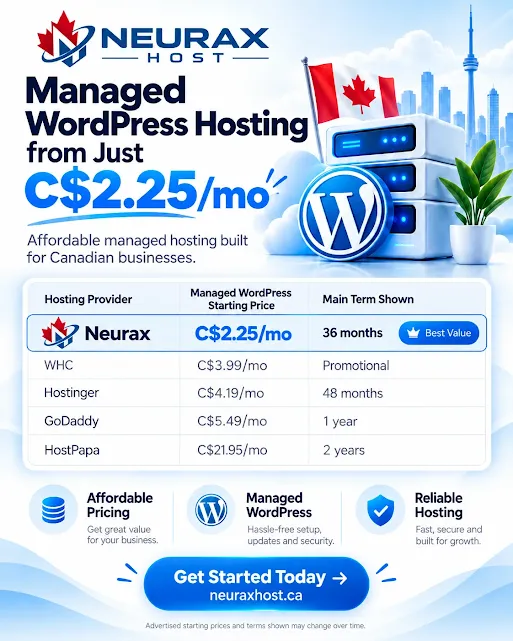
Neurax currently offers different Managed WordPress plans, including WP Secure Start, WP Business Shield, and WP Elite Pro, with different storage, CPU, RAM, backup, security, and performance features. This allows customers to choose a plan based on their website requirements rather than paying for resources they may not need.
The right choice depends on your website size, traffic, business goals, storage needs, security requirements, and expected growth.
Frequently Asked Questions
Is managed WordPress hosting worth it for a small business?
Managed WordPress Hosting can be useful for a small business that wants to spend less time handling technical hosting tasks. Neurax Host’s entry-level WP Secure Start plan is designed for small websites and includes automatic updates, weekly backups, staging, malware scanning and removal, LiteSpeed, CDN, and a dedicated vCPU. This can provide a more managed environment as the business website grows.
Does managed WordPress hosting include backups?
Yes. Neurax Host includes backups on its Managed WordPress plans, but the backup schedule and retention depend on the plan. WP Secure Start includes weekly backups, WP Business Shield includes daily backups with 30-day retention, and WP Elite Pro includes daily and on-demand backups with instant restore. Neurax Host also recommends keeping an independent backup because hosting backups should not be the only copy of important website data.
Does managed WordPress hosting include malware protection?
Yes. Neurax Host’s Managed WordPress plans include malware scanning and removal. WP Business Shield adds real-time malware removal along with a Web Application Firewall, advanced DDoS protection, brute-force protection, and 2FA login protection. These security layers help protect WordPress websites from common threats, although no hosting service can guarantee complete protection from every online attack.
Can managed WordPress hosting support WooCommerce?
Yes. Neurax Host’s Managed WordPress hosting supports WooCommerce. The WP Business Shield plan is specifically optimized for WooCommerce and includes dedicated vCPU resources, NVMe storage, advanced caching, CDN, backups, staging, and security features. WP Elite Pro also includes WooCommerce High-Performance Mode for larger or more resource-intensive stores.
When should a website upgrade from basic WordPress hosting?
A website should consider upgrading when its current hosting starts limiting performance, security, resources, or management. Signs include slower page loads, increasing traffic, frequent resource limits, a growing WooCommerce store, the need for staging, stronger security, more reliable backups, or greater server resources. Neurax Host offers different Managed WordPress plans so a website can move from a basic setup to plans with more CPU, RAM, storage, backups, security controls, and development features as its needs increase.
Ready to Make WordPress Hosting Easier?
Your website should support your business, not become another technical task on your daily list. Managed WordPress Hosting can reduce the work involved in website maintenance while giving you access to performance, security, backups, SSL, migration, and support.
If you want a WordPress hosting solution built with business growth in mind, explore Neurax Managed WordPress Hosting and choose the plan that fits your website today and your future needs.